
Migrating From MySQL to DynamoDB Using the cdk-dms-replication Construct
Introduction
How would you migrate a MySQL database to DynamoDB with zero downtime? One of the big assignments I had at Amazon was migrating a database from MySQL to DynamoDB as part of a wider org initiative to use DynamoDB for customer-facing services wherever possible. Making the call to do the migration rather than to push back was pretty easy — the company has a lot of accumulated internal knowledge and personnel expertise in supporting DynamoDB, all of the front end components meshed well with DynamoDB as the expected data back end, and there were no access patterns that locked us into using a relational database. I still faced the problem of how to get the data into DynamoDB, which wasn’t as well documented internally.
Ultimately the solution was using AWS DMS, which allowed me to migrate the data with zero downtime. After writing the new data access code, hidden behind a feature flag, DMS let me migrate the data and keep it up-to-date before the switchover. In previous posts, I separately described Single Table Design in DynamoDB and Migrating a Database using AWS CDK, and in this one I will show how I used both concepts with a sample migration.
Data Modeling with an ERD
In The DynamoDB Book, Alex DeBrie describes using an Entity Relationship Diagram (ERD) to map the relationships of your entities in your data model to understand how to represent your entities’ relationships in a DynamoDB table. The Aurora MySQL database from my previous post was for a video rental store (never mind that those don’t exist anymore), with tables for actors, films, customers, rentals, categories, and languages, as well as helper tables to speed up indices for actors, categories, and films. Mapping out the relationships between the entities looks like this.
Single Table Design
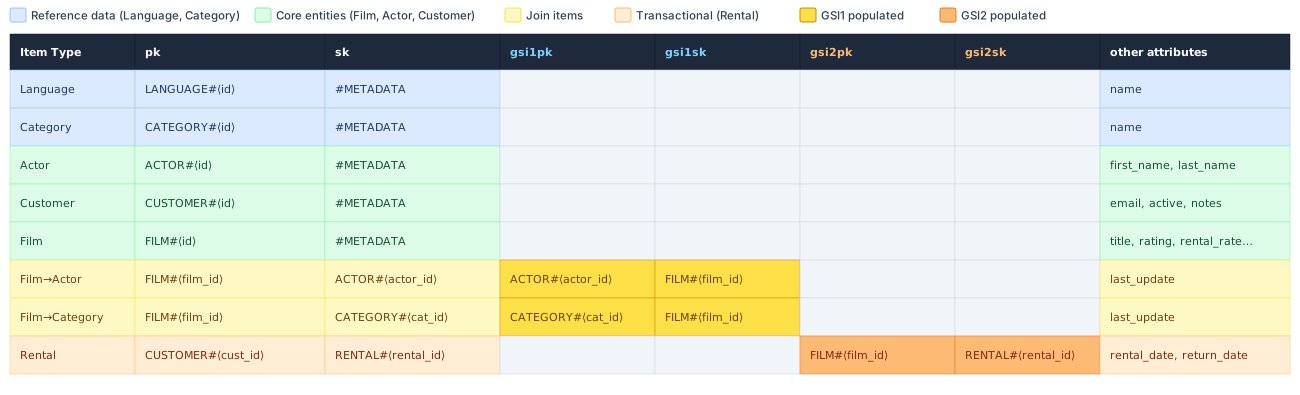
The ERD suggests Item Collections based on Films, Customers, Actors, and Categories, with Films having item collections based on their own content (actors and categories) as well as their associated rentals. The primary keys use the form ENTITY_TYPE#<id>. Querying for a film returns the film’s metadata and its associated actors and categories, while querying a customer returns the customer’s metadata and rentals. Secondary indices allow us to do reverse lookup of films for a given actor, films for a given category, or rentals for a given film.
DMS CDK Code
The DMS CDK is similar to the code I showed in my previous post, though I have a few important changes. First, I want to show how to run a full load and change data capture (CDC) migration, which will load the current contents of the source database and continue to copy over changes until you are ready to make the switchover in the application code. Second, changing from a SQL database to a NoSQL database requires transforming the data, so I need to write some table mappings. Finally, a migration with a DynamoDB table target requires permissions to create and alter some support tables, so I added policies to the DMS Service Access Role to allow those changes.
Running a full load and CDC migration requires one change to the source database. If your MySQL database does not already have binlog_format set to ROW, you will have to change that in the source database. For an Aurora MySQL database already defined in AWS CDK, it would look like this:
// Define binlog_format and binlog_row_image in a parameter group
const dbParameterGroup = new rds.ParameterGroup(this, 'DbParameterGroup', {
  engine: rds.DatabaseInstanceEngine.mysql({ version: rds.MysqlEngineVersion.VER_8_0 }),
  parameters: {
    binlog_format: 'ROW',
    binlog_row_image: 'FULL',
  },
});

// Apply the parameter group to the database instance
const db = new rds.DatabaseInstance(this, 'MySqlDb', {
  engine: rds.DatabaseInstanceEngine.mysql({
    version: rds.MysqlEngineVersion.VER_8_0,
  }),
  instanceType: ec2.InstanceType.of(ec2.InstanceClass.T3, ec2.InstanceSize.MICRO),
  vpc,
  vpcSubnets: { subnetType: ec2.SubnetType.PRIVATE_ISOLATED },
  securityGroups: [dbSecurityGroup],
  databaseName: 'yourdb',
  credentials: rds.Credentials.fromGeneratedSecret('dms_user'),
  parameterGroup: dbParameterGroup,
  multiAz: false,
  removalPolicy: cdk.RemovalPolicy.DESTROY, // Should be RETAIN for most production use cases
  deletionProtection: false,
});
Applying new parameter group settings requires restarting the database. This was actually the only downtime when I was running my own migration.
Next, changing from a SQL database to a NoSQL database requires data transformation, which in this case can be done with table mappings, defined in JSON. This part always takes me the longest, and honestly it will take a bit of trial and error to get the right configuration, so definitely use a test instance if you ever need to do this.
const tableMappings = JSON.stringify({
  rules: [
    {
      'rule-type': 'selection',
      'rule-id': '1',
      'rule-name': 'include-all',
      'rule-action': 'include',
      'object-locator': {
        'schema-name': 'yourdb',
        'table-name': '%'
      }
    },
    {
      'rule-type': 'selection',
      'rule-id': '2',
      'rule-name': 'exclude-film-text',
      'rule-action': 'exclude',
      'object-locator': {
        'schema-name': 'yourdb',
        'table-name': 'film_text'
      }
    },
    {
      'rule-type': 'object-mapping',
      'rule-id': '10',
      'rule-name': 'map-language',
      'rule-action': 'map-record-to-record',
      'object-locator': {
        'schema-name': 'yourdb',
        'table-name': 'language'
      },
      'target-table-name': 'migration-target-table',
      'mapping-parameters': {
        'partition-key-name': 'pk',
        'sort-key-name': 'sk',
        'attribute-mappings': [
          {
            'target-attribute-name': 'pk',
            'attribute-type': 'scalar',
            'attribute-sub-type': 'string',
            'value': 'LANGUAGE#${language_id}'
          },
          {
            'target-attribute-name': 'sk',
            'attribute-type': 'scalar',
            'attribute-sub-type': 'string',
            'value': '#METADATA'
          },
        ],
      },
    },
    {
      'rule-type': 'object-mapping',
      'rule-id': '11',
      'rule-name': 'map-actor',
      'rule-action': 'map-record-to-record',
      'object-locator': {
        'schema-name': 'yourdb',
        'table-name': 'actor'
      },
      'target-table-name': 'migration-target-table',
      'mapping-parameters': {
        'partition-key-name': 'pk',
        'sort-key-name': 'sk',
        'attribute-mappings': [
          {
            'target-attribute-name': 'pk',
            'attribute-type': 'scalar',
            'attribute-sub-type': 'string',
            'value': 'ACTOR#${actor_id}'
          },
          {
            'target-attribute-name': 'sk',
            'attribute-type': 'scalar',
            'attribute-sub-type': 'string',
            'value': '#METADATA'
          },
        ],
      },
    },
    {
      'rule-type': 'object-mapping', 'rule-id': '12', 'rule-name': 'map-film',
      'rule-action': 'map-record-to-record',
      'object-locator': {
        'schema-name': 'yourdb',
        'table-name': 'film'
      },
      'target-table-name': 'migration-target-table',
      'mapping-parameters': {
        'partition-key-name': 'pk',
        'sort-key-name': 'sk',
        'attribute-mappings': [
          {
            'target-attribute-name': 'pk',
            'attribute-type': 'scalar',
            'attribute-sub-type': 'string',
            'value': 'FILM#${film_id}'
          },
          {
            'target-attribute-name': 'sk',
            'attribute-type': 'scalar',
            'attribute-sub-type': 'string',
            'value': '#METADATA'
          },
        ],
      },
    },
    {
      'rule-type': 'object-mapping',
      'rule-id': '13',
      'rule-name': 'map-category',
      'rule-action': 'map-record-to-record',
      'object-locator': {
        'schema-name': 'yourdb',
        'table-name': 'category'
      },
      'target-table-name': 'migration-target-table',
      'mapping-parameters': {
        'partition-key-name': 'pk',
        'sort-key-name': 'sk',
        'attribute-mappings': [
          {
            'target-attribute-name': 'pk',
            'attribute-type': 'scalar',
            'attribute-sub-type': 'string',
            'value': 'CATEGORY#${category_id}'
          },
          {
            'target-attribute-name': 'sk',
            'attribute-type': 'scalar',
            'attribute-sub-type': 'string',
            'value': '#METADATA'
          },
        ],
      },
    },
    {
      'rule-type': 'object-mapping',
      'rule-id': '14',
      'rule-name': 'map-customer',
      'rule-action': 'map-record-to-record',
      'object-locator': {
        'schema-name': 'yourdb',
        'table-name': 'customer'
      },
      'target-table-name': 'migration-target-table',
      'mapping-parameters': {
        'partition-key-name': 'pk',
        'sort-key-name': 'sk',
        'attribute-mappings': [
          {
            'target-attribute-name': 'pk',
            'attribute-type': 'scalar',
            'attribute-sub-type': 'string',
            'value': 'CUSTOMER#${customer_id}'
          },
          {
            'target-attribute-name': 'sk',
            'attribute-type': 'scalar',
            'attribute-sub-type': 'string',
            'value': '#METADATA'
          },
        ],
      },
    },
    {
      'rule-type': 'object-mapping',
      'rule-id': '15',
      'rule-name': 'map-film-actor',
      'rule-action': 'map-record-to-record',
      'object-locator': {
        'schema-name': 'yourdb',
        'table-name': 'film_actor'
      },
      'target-table-name': 'migration-target-table',
      'mapping-parameters': {
        'partition-key-name': 'pk',
        'sort-key-name': 'sk',
        'attribute-mappings': [
          {
            'target-attribute-name': 'pk',
            'attribute-type': 'scalar',
            'attribute-sub-type': 'string',
            'value': 'FILM#${film_id}'
          },
          {
            'target-attribute-name': 'sk',
            'attribute-type': 'scalar',
            'attribute-sub-type': 'string',
            'value': 'ACTOR#${actor_id}'
          },
          {
            'target-attribute-name': 'gsi1pk',
            'attribute-type': 'scalar',
            'attribute-sub-type': 'string',
            'value': 'ACTOR#${actor_id}'
          },
          {
            'target-attribute-name': 'gsi1sk',
            'attribute-type': 'scalar',
            'attribute-sub-type': 'string',
            'value': 'FILM#${film_id}'
          },
        ],
      },
    },
    {
      'rule-type': 'object-mapping',
      'rule-id': '16',
      'rule-name': 'map-film-category',
      'rule-action': 'map-record-to-record',
      'object-locator': {
        'schema-name': 'yourdb',
        'table-name': 'film_category'
      },
      'target-table-name': 'migration-target-table',
      'mapping-parameters': {
        'partition-key-name': 'pk',
        'sort-key-name': 'sk',
        'attribute-mappings': [
          {
            'target-attribute-name': 'pk',
            'attribute-type': 'scalar',
            'attribute-sub-type': 'string',
            'value': 'FILM#${film_id}'
          },
          {
            'target-attribute-name': 'sk',
            'attribute-type': 'scalar',
            'attribute-sub-type': 'string',
            'value': 'CATEGORY#${category_id}'
          },
          {
            'target-attribute-name': 'gsi1pk',
            'attribute-type': 'scalar',
            'attribute-sub-type': 'string',
            'value': 'CATEGORY#${category_id}'
          },
          {
            'target-attribute-name': 'gsi1sk',
            'attribute-type': 'scalar',
            'attribute-sub-type': 'string',
            'value': 'FILM#${film_id}'
          },
        ],
      },
    },
    {
      'rule-type': 'object-mapping',
      'rule-id': '17',
      'rule-name': 'map-rental',
      'rule-action': 'map-record-to-record',
      'object-locator': {
        'schema-name': 'yourdb',
        'table-name': 'rental'
      },
      'target-table-name': 'migration-target-table',
      'mapping-parameters': {
        'partition-key-name': 'pk',
        'sort-key-name': 'sk',
        'attribute-mappings': [
          {
            'target-attribute-name': 'pk',
            'attribute-type': 'scalar',
            'attribute-sub-type': 'string',
            'value': 'CUSTOMER#${customer_id}'
          },
          {
            'target-attribute-name': 'sk',
            'attribute-type': 'scalar',
            'attribute-sub-type': 'string',
            'value': 'RENTAL#${rental_id}'
          },
          {
            'target-attribute-name': 'gsi2pk',
            'attribute-type': 'scalar',
            'attribute-sub-type': 'string',
            'value': 'INVENTORY#${inventory_id}'
          },
          {
            'target-attribute-name': 'gsi2sk',
            'attribute-type': 'scalar',
            'attribute-sub-type': 'string',
            'value': 'RENTAL#${rental_id}'
          },
        ],
      },
    },
  ],
});
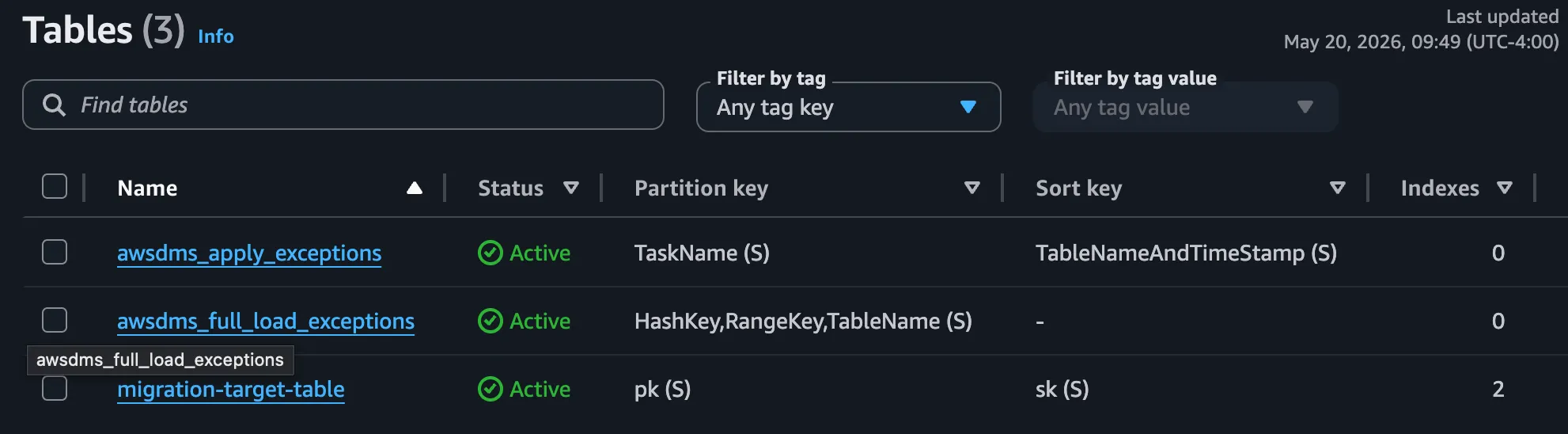
Finally, the IAM role that gives access to the target database should also have permissions to create the new DMS tables, awsdms_full_load_exceptions and awsdms_apply_exceptions. I’ve included the code that I used to create the target table as well, since I wanted to define GSIs — otherwise the IAM role would need permission to create a table on its own and DMS itself would not define any GSIs.
const dynamoTable = new dynamodb.Table(this, 'MigrationTargetTable', {
  tableName: 'migration-target-table',
  partitionKey: { name: 'pk', type: dynamodb.AttributeType.STRING },
  sortKey: { name: 'sk', type: dynamodb.AttributeType.STRING },
  billingMode: dynamodb.BillingMode.PAY_PER_REQUEST,
  removalPolicy: cdk.RemovalPolicy.DESTROY,
});

dynamoTable.addGlobalSecondaryIndex({
  indexName: 'GSI1',
  partitionKey: { name: 'gsi1pk', type: dynamodb.AttributeType.STRING },
  sortKey: { name: 'gsi1sk', type: dynamodb.AttributeType.STRING },
  projectionType: dynamodb.ProjectionType.ALL,
});

dynamoTable.addGlobalSecondaryIndex({
  indexName: 'GSI2',
  partitionKey: { name: 'gsi2pk', type: dynamodb.AttributeType.STRING },
  sortKey: { name: 'gsi2sk', type: dynamodb.AttributeType.STRING },
  projectionType: dynamodb.ProjectionType.ALL,
});

const dmsDynamoDBRole = new iam.Role(this, 'DmsDynamoDbAccessRole', {
  roleName: 'dms-dynamodb-role',
  assumedBy: new iam.ServicePrincipal('dms.amazonaws.com'),
  description: 'Role for DMS to access DynamoDB table',
});

dmsDynamoDBRole.addToPolicy(new iam.PolicyStatement({
  effect: iam.Effect.ALLOW,
  actions: [
    'dynamodb:PutItem',
    'dynamodb:UpdateItem',
    'dynamodb:DeleteItem',
    'dynamodb:DescribeTable',
    'dynamodb:BatchWriteItem',
    'dynamodb:Scan',
    'dynamodb:Query'
  ],
  resources: [dynamoTable.tableArn]
}));

// DMS creates and writes to its own internal tables during migration
dmsDynamoDBRole.addToPolicy(new iam.PolicyStatement({
  effect: iam.Effect.ALLOW,
  actions: [
    'dynamodb:CreateTable',
    'dynamodb:PutItem',
    'dynamodb:UpdateItem',
    'dynamodb:DeleteItem',
    'dynamodb:DescribeTable',
    'dynamodb:BatchWriteItem',
    'dynamodb:Scan',
    'dynamodb:Query'
  ],
  resources: [`arn:aws:dynamodb:${this.region}:${this.account}:table/awsdms_*`]
}));

// ListTables is account-scoped — DMS calls it during the connection test
dmsDynamoDBRole.addToPolicy(new iam.PolicyStatement({
  effect: iam.Effect.ALLOW,
  actions: ['dynamodb:ListTables'],
  resources: ['*']
}));
With the source database changes applied, the table mappings defined, and the IAM Role defined, we can provision the migration with a single line using cdk-dms-replication:
new DmsMigrationPipeline(this, 'Test', {
  vpc,
  vpcSubnets: { subnetType: ec2.SubnetType.PRIVATE_ISOLATED },
  replicationInstanceClass: ReplicationInstanceClass.T3_MEDIUM,
  migrationType: MigrationType.FULL_LOAD_AND_CDC,
  sourceEndpoint: {
    engine: EndpointEngine.MYSQL,
    serverName: db.dbInstanceEndpointAddress,
    port: 3306,
    username: 'dms_user',
    password: db.secret!.secretValueFromJson('password'),
    databaseName: 'yourdb',
  },
  targetEndpoint: {
    engine: EndpointEngine.DYNAMODB,
    dynamoDbSettings: {
      serviceAccessRoleArn: dmsDynamoDBRole.roleArn,
    },
  },
  tableMappings,
  taskSettings: new TaskSettings()
    .withTargetTablePrepMode('DO_NOTHING')
    .toJson(),
});
I deployed the infrastructure and started the replication task.
cdk synth
cdk deploy DmsTestStack
aws dms describe-replication-tasks --query 'ReplicationTasks[*].[ReplicationTaskIdentifier,ReplicationTaskArn]' --output table
aws dms start-replication-task --replication-task-arn <task-arn> --start-replication-task-type start-replication
Result
Each of the new tables is created: the target table and the two DMS tables.
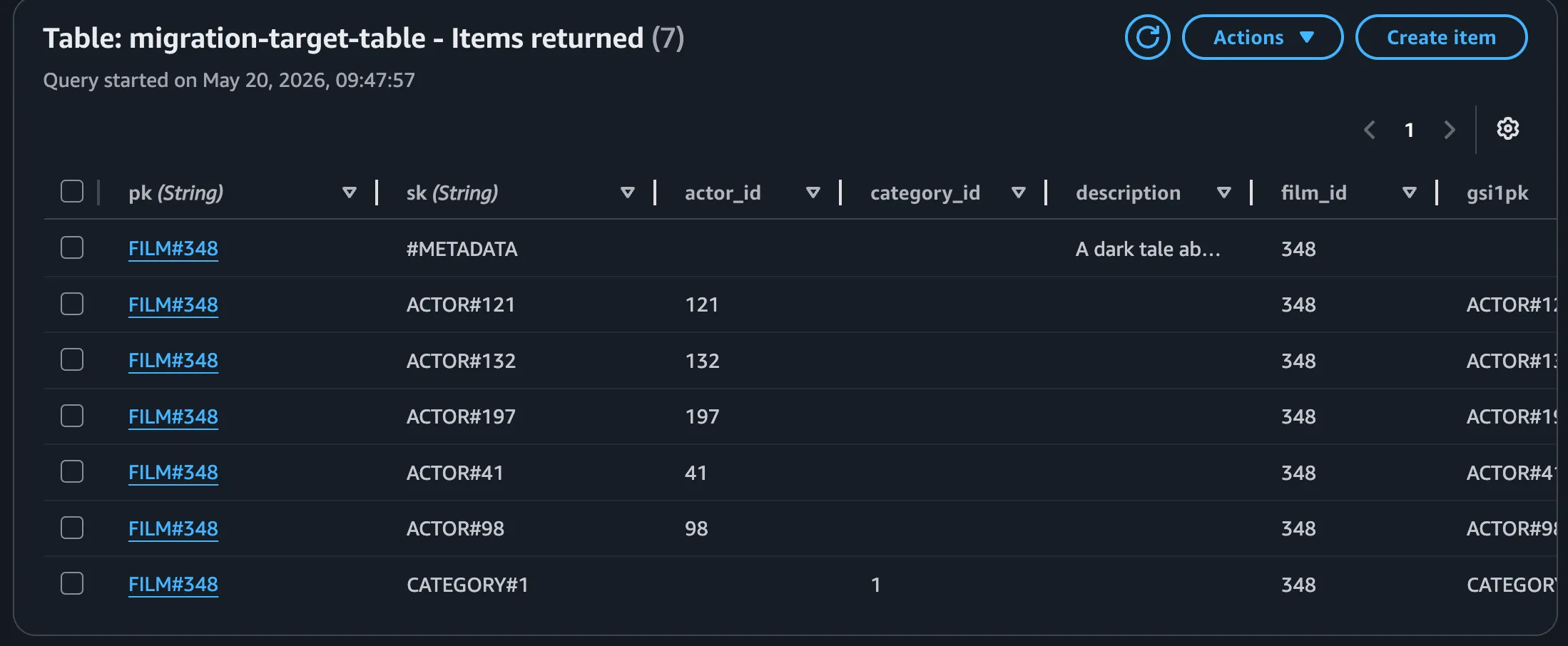
The data are migrated to DynamoDB and queryable via the partition key.
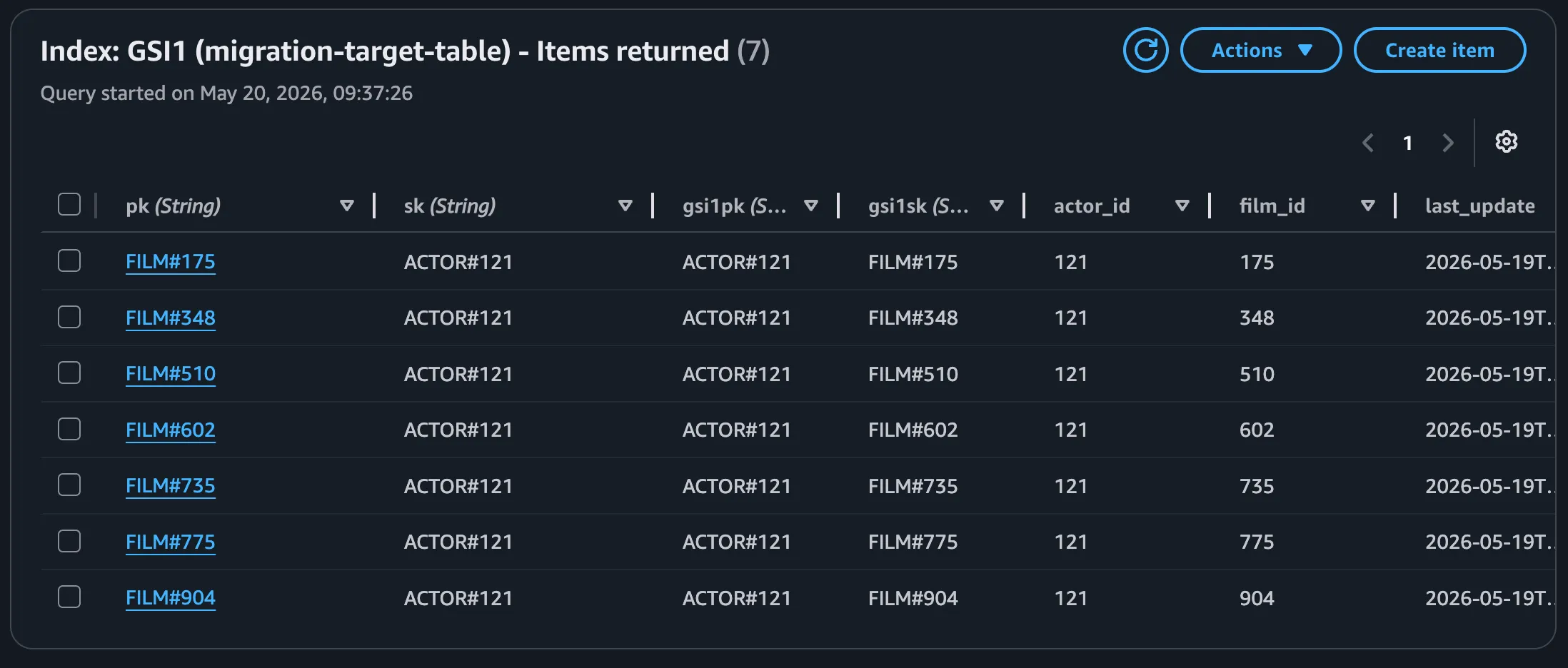
The data can also be queried by GSI.
Conclusion
Once you’ve made the decision to migrate a database to DynamoDB, DMS allows you to make the migration with zero downtime. Using cdk-dms-replication, you can provision your DMS migration quickly, saving your focus for defining the table mappings that will drive the success of your migration. If you’re doing this or other DMS migrations, I encourage you to give it a try, and feel free to give feedback or contribute on GitHub.