
Indexes, Front End, and OLAP with DynamoDB
Introduction
In my previous post on Single Table Design in DynamoDB, I described a method of data modeling relational data for storing in DynamoDB. I proudly showed the post to my brother, who responded not with congratulations and compliments but instead with questions. Why are we going through all this when we already having indexing in our relational databases? What kind of limitation does this design (and DynamoDB generally) have on the front end? What if I need to do read-heavy queries or ad hoc queries for business intelligence or data analytics? Congrats, bro, you’ve written the outline of a blog post.
How is DynamoDB indexing Different from Database indexing?
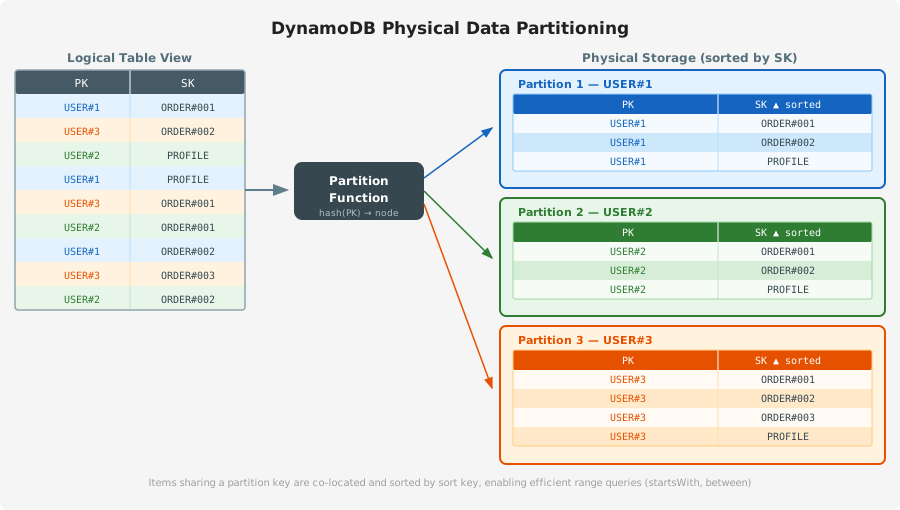
Primary keys in DynamoDB and in relational databases bear some similarity, in that they satisfy a uniqueness constraint with an index on top. However, while this is a uniqueness constraint in both databases, in DynamoDB it’s a data distribution strategy as well. The partition key in DynamoDB determines which node is storing the item. Items with the same primary key are stored physically closer to each other. This resembles the behavior of clustered indices on relational databases (such as InnoDB), with the advantage that in DynamoDB you can store data of different types in the same table.
Additionally, in DynamoDB items are stored in sorted order based on the sort key within each partition. This is why startsWith and between operations are so useful and fast in DynamoDB — the data are stored already sorted.
Considerations for front end
One of the downsides to using an opinionated data store is that it enforces some of those opinions all the way to the application level, as it is not flexible enough to accommodate new access patterns. One of the common front end tools that I have had to implement at more than one company is a grid of user data with an associated search or filter grid.
Often we would write these grids to use a backend filter feeding values to a query on a relational database, either via a stored procedure with sanitized inputs or an object relational mapping (ORM) function. Depending on the filter or search terms used by the customers, the query would change the WHERE clause to fit the values returned by the customer.
If this table is driven by DynamoDB, however, a backend filter doesn’t really work. DynamoDB does allow filtering on attributes outside of the primary key, but these filters are performed after the query. You would need to pay for the full response of the query, even if you filter to only return a small subset of that query.
Hence the easiest way to implement a table for DynamoDB data is with the sorting and filtering on the client side. Amazon’s internal component system, released publicly as the Cloudscape component system, reveals their preference for the client-side filter approach with its Table component and its associated collection hooks package. If you’re not loading a large amount of data into these tables this and other client-side filter approaches can work very well.
If you did still need to create a search application against that data, you should probably stream to a search-oriented data store, such as OpenSearch. This is one motivation behind DynamoDB zero-ETL integration with OpenSearch, which allows you to use a DynamoDB table as a source for OpenSearch ingestion. Amazon provides a tutorial for creating a search app with OpenSearch. I myself used OpenSearch as the data source for a table view; I might make a tutorial some time for that one.
What if I want to do read-heavy queries or ad hoc queries to support business intelligence or data analytics?
DynamoDB is an example of a nonrelational denormalized OLTP (online transactional processing) database. OLTP databases specialize in transactions — the creation, editing, and deleting of new data, often customer-facing.
Business intelligence and data analytics are tasks better performed with OLAP (online analytical processing) databases. Usually these functions are read heavy, cover a large breadth of data relating to a large number of different customers, and are business-focused (often internal). These data are often used to drive dashboards to communicate to business leadership, with data stored in data lakes (stores of raw data without a set schema) or data warehouses (structured data stores such as Snowflake).
Hence the best way to perform business intelligence or data analytics on DynamoDB data is to extract that data to an OLAP data store. I’ve typically used AWS Glue to perform ETL (extract, transform, and load) on the DynamoDB table into a Data Lake, which I then queried with Amazon Athena. Abishek Roy has an excellent example of how this is done in his blog.
One side benefit of the data lake is that developers can use the data lake, too. In cases where you need to determine which rows to change during a backfill, you can query the data lake to get a list of the affected rows, rather than querying directly against the transactional database. Broad queries like this can require table scans even on relational databases, so the OLAP data store has the advantage of letting you run heavy queries against your data without directly affecting performance for the customers.
Comments
No comments yet. Be the first to reply on Bluesky!